


Chuck E. Cheese Fun Pass
4.63.48K Reviews
App Specs
- Version
- 2.6
- Updated On
- License
- Free
- Downloads
- 1,000,000+
- Developer
- Chuck E. Cheese
- Categories
- Food & Drink
- Platform
- Android, iOS
Screenshots

 Analysis by AppCompare
When I judge a family food-and-entertainment app, I look beyond bright graphics: can a parent find the useful details while juggling a plan, and can different family members use it comfortably? Chuck E. Cheese Fun Pass is aimed at people who already visit Chuck E. Cheese or are considering a visit. Its strongest appeal is practical rather than broad: it brings pass and reward management, visit planning, and entertainment into one place, though that blend will matter less to someone who rarely goes.
Readable screens and a family-focused layout
In my experience, the colorful interface makes the app feel connected to the venue, and the main dashboard gives the experience a clear starting point. That visual style suits the family setting, but bright, playful graphics can also make a screen feel busy when someone is trying to locate one specific task. I’d approach it as a companion for a planned visit, rather than assuming it will be the quickest way to do every food-related errand.
The app is free, and Chuck E. Cheese is its developer. It is listed in the food and drink category, but its role reaches beyond browsing food: the emphasis is on managing a pass, keeping an eye on rewards, and organizing time at a Chuck E. Cheese location. That distinction matters when comparing it with a general restaurant app, where ordering and menus tend to be the central reason to open it.
Different ages, comfort levels, and attention needs
I like that the app has an obvious family audience, yet an inviting design is not the same as being easy for every child or adult to use. A parent can take the lead on account and visit tasks while a child enjoys the more playful parts. If your child finds animated, colorful screens distracting or has difficulty navigating phone menus, I would keep the practical steps in an adult’s hands instead of treating the app as an independent activity.
There is also a useful distinction between the app’s on-screen entertainment and the purpose of a real visit. The game section can offer something to explore away from the venue, while pass and event tools support planning. If someone is sensitive to lively visuals or prefers a quieter interface, the playful presentation may not be their first choice. I would let that person try the screens briefly before relying on the app for an important plan.
Using it around real plans
A realistic use is opening the app before a family outing: check the pass and rewards, sort out the visit or event details, then put the phone away once everyone is ready to go. That keeps the app’s strongest tools together and avoids making a child wait while an adult searches through a phone during a busy moment. I would also review the relevant details before leaving rather than assuming a phone will be convenient to use once the family is on the move.
For a birthday or group outing, event planning can be more useful than the games section because it supports coordination before the day itself. It still won’t replace a conversation among the adults responsible for the plan: a shared screen does not automatically mean everyone has the same expectations. I’d use the app to organize the Chuck E. Cheese side of the outing, then confirm practical arrangements with the other people involved.
Worth Reading Before You Choose

Baby Panda World Brings Quick Play to Modern Phones, but Its Game Library Feels Busy

ESPN’s Live Game View Makes Following Close Games Easier

QuizzLand Review: A Good Fit for Short Trivia Breaks, Not Every Player

Basketball Stars: Multiplayer Is Fast, but Can It Recover When Matches Go Wrong?

WEBTOON Turns Phone Updates Into a Better Reading Routine

Link to Windows Runs on Shared Habits, Not Social Feeds
Where it fits—and where it does not
The app has an average rating of 4.6 from around 14,000 ratings, and it has been installed over a million times. Those figures suggest that many people have tried it, but I wouldn’t treat popularity as a guarantee that it suits every family. Its value depends on whether Chuck E. Cheese visits, pass management, rewards, or event planning are relevant to your routine.
If you mainly want to order a meal from a range of restaurants, a general food-ordering app is likely a better fit. If your goal is simply to find a nearby place to eat, a maps app may be more direct. This one makes more sense when you want a Chuck E. Cheese-specific companion, rather than a replacement for those broader tools. The practical trade-off is focus: useful in its intended setting, less compelling outside it.
I would also avoid relying on a rewards reminder as the only way to keep track of something important. Notifications can be easy to miss in a busy household, and different family members may not all use the same account or phone. A quick check of the app before a visit is a sensible habit; it keeps the pass and rewards in view without turning a notification into a promise that everything has been noticed.
A closer look at everyday use
The app is free and carries an Everyone content rating. It was released on May 7, 2021, and its current version is 2.5, with Android 10 as the minimum operating-system requirement. I’d check that an older phone meets that requirement before planning around the app. The rating makes its intended audience broad, but parents should still decide whether the screen experience suits their own child.
For someone who benefits from a slower pace, I’d suggest exploring the dashboard at home rather than learning it in the middle of a busy outing. That gives an adult time to locate the pass and rewards without pressure, and it gives a child the option to look at the playful sections when waiting is not the issue. This simple timing choice can make the app feel more helpful without assuming that every screen or interaction will work equally well for every person.
What to check before depending on it
A practical question is whether the app is worth installing if you only visit occasionally. My answer is: perhaps, if you expect to manage a pass, use rewards, or arrange an event; otherwise, it may add little to your phone. For a one-off meal, a direct visit or a broader ordering tool can be simpler. The app’s best case is repeated relevance, not merely having another icon available.
Another question is whether it can keep children occupied while adults handle logistics. The game room may help provide something for kids to explore, but I would not make it the sole plan for keeping a group settled. Phones need to be shared, charged, and put away when attention is needed elsewhere. Treating the games as an optional extra, rather than the foundation of an outing, is the more dependable approach.
Families may also wonder whether the app is suitable for someone who finds phone navigation difficult. I would have an adult set up and manage the account-related tasks, then invite the child to engage only with the parts they can comfortably follow. That division keeps the useful planning tools accessible to the person coordinating the outing while avoiding pressure on a child to handle menus or decisions independently.
My inclusive verdict
Overall, I see this as a focused family companion, not an all-purpose food app and not a substitute for adult planning. Its playful presentation and mix of pass, rewards, event planning, and games can serve families who already have a reason to visit Chuck E. Cheese. The same visual energy and narrow focus may be a poor match for people who prefer restrained screens, need a very simple interface, or want broad restaurant choices.
If you use it, my advice is to explore it before the day, keep an adult responsible for practical details, and treat reminders and games as conveniences rather than guarantees. That approach makes room for different ages and comfort levels while keeping expectations realistic.
Getting Started with the Fun Pass
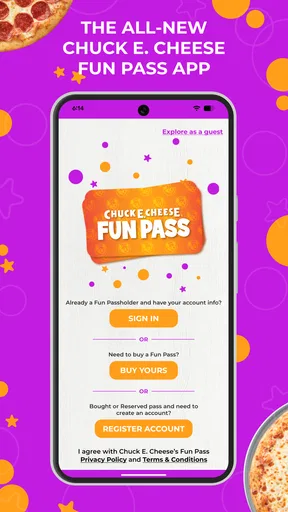
Right off the bat, downloading and setting up the Chuck E. Cheese Fun Pass was a breeze. Available on both Android and iOS, the app is free to download. Once installed, I was greeted by a colorful interface that instantly reminded me of the playful atmosphere at Chuck E. Cheese venues.
After creating an account, which was pretty straightforward, I was navigated to the main dashboard. Here, you can manage your Pass, keep track of your rewards, and even plan your future visits. It’s like having a mini Chuck E. Cheese world right in your pocket!
Features That Make It Stand Out
The app is packed with a bunch of fun and functional features. Here’s a breakdown of what I found most exciting:
- Rewards System: This is one of the standout features. The app allows you to earn points with every purchase, which can be redeemed for exciting rewards. It’s a great way to make each visit to Chuck E. Cheese even more rewarding.
- Game Room: Yes, you heard it right! The app includes a game room section where you can play a variety of games. It’s perfect for kids to enjoy their favorite Chuck E. Cheese games from anywhere.
- Event Planner: Planning a birthday party or a family outing? The app makes it easy to book events and manage details right from your phone.
Exploring these features was a delight, and I found myself getting lost in the games section more than I’d like to admit!
My Experience with the Interface
Navigation through the app is smooth, with a user-friendly design that’s intuitive for all ages. The vibrant colors and playful graphics really capture the essence of Chuck E. Cheese, making it an engaging experience for kids.
One thing that stood out to me was the seamless integration of the rewards system. It’s all very easy to keep track of, and the app even sends you reminders about your rewards, so you never miss out on a chance to earn more.
Fun for Kids, and a Trip Down Memory Lane for Adults
The Chuck E. Cheese Fun Pass app is not just about games and rewards; it’s about nostalgia. While the kids enjoy the interactive games and features, adults can take a trip down memory lane with the familiar sights and sounds of Chuck E. Cheese.
I found myself recalling my own childhood visits, and it was heartwarming to see how the app keeps the spirit of Chuck E. Cheese alive in this digital age. The ability to plan events and earn rewards adds a practical touch, making it more than just a mobile game hub.
Wrapping It Up
All in all, the Chuck E. Cheese Fun Pass app is a delightful addition for families looking to enhance their Chuck E. Cheese experience. It combines fun, functionality, and a dash of nostalgia into one neat package. Whether you’re planning your next visit, managing rewards, or just looking to entertain the kids, this app has got you covered.
So, if you’re a fan of Chuck E. Cheese or looking for a way to bring some extra fun into your child’s day, give this app a try. It’s like having a slice of that cheesy fun, right in your pocket!
Pros
- Engaging for kids with interactive games.
- Offers rewards and exclusive member perks.
- Easy-to-use interface for children.
- Regular updates with new content.
- Parental controls ensure safe usage.
Cons
- Requires constant internet connection.
- Limited features without subscription.
- Can be repetitive after extended play.
- In-app purchases may add up quickly.
- Not suitable for older audiences.
FAQs for Chuck E. Cheese Fun Pass
What is the Chuck E. Cheese Fun Pass app?
The Chuck E. Cheese Fun Pass app is a mobile application designed to enhance your experience at Chuck E. Cheese locations. It provides various features, including the ability to track gameplay, earn rewards, and manage your time at the arcade more efficiently. It's available for both Android and iOS devices.
How do I use the Chuck E. Cheese Fun Pass app at the arcade?
To use the app, simply download it from the Google Play Store or Apple App Store. Once installed, you can create an account or log in if you already have one. The app allows you to load credits, track your playtime, and redeem rewards directly through your mobile device, making your visit more convenient.
Are there any costs associated with using the app?
Downloading the Chuck E. Cheese Fun Pass app is free. However, purchasing credits or passes through the app incurs costs similar to those at the physical location. You can manage and purchase these directly within the app, which allows for an easy and streamlined experience at the arcade.
Can I earn rewards with the Chuck E. Cheese Fun Pass app?
Yes, the app includes a rewards system that lets you earn points and unlock special offers. As you play games and engage with the app, you can accumulate points that can be redeemed for various rewards at participating Chuck E. Cheese locations. This adds extra value to your visits.
Is the Chuck E. Cheese Fun Pass app suitable for all ages?
While the app is designed with kids in mind, it is user-friendly for all age groups. Parents can easily manage accounts and oversee their children's usage, ensuring a safe gaming environment. The app also provides features that are enjoyable for adults, making it a family-friendly tool.


